

How it works
Every run examines a bounded recent-merge window and selects at most one coherent gap. The agent downloads the exact default-branch commit it inspected, keeps a private untouched baseline, follows the repository’s own test instructions, and runs the narrowest relevant validation commands. The publishing tool compares the tested snapshot with the baseline. It rejects production changes, unlisted paths, deletions, symlinks, and oversized files before it can write to GitHub.Start with the example
Deploy to OpenComputer
Review the GitHub credential boundary and deploy the agent to Development.
Configure a fixture repository
Start with a disposable repository containing a recent merged change and a deliberately missing regression test. Set that fixed destination inopencomputer/agents/test-coverage/tools/config.ts:
codeload.github.com; they do not require a second secret.
Test in Development
Watch the source and deploy changes to the remote Development environment:PUBLISH_ENABLED set to false, the agent can inspect the fixture, edit
its isolated snapshot, run tests, and perform the final audit, but the
publishing tool returns a dry-run result without creating a branch or pull
request.
Review the selected risk, proposed test paths, and observed command results.
If they are correct, set PUBLISH_ENABLED to true, let the watch deployment
finish, and start a new session with the same request.
The published branch is deterministically named
test/coverage-<head-sha>. Repeating the run for the same repository head
returns the existing open pull request rather than creating a duplicate.
After changing the example source, wait for the Development watch deployment
to finish and start a new session. Existing sessions remain pinned to the
deployment with which they started.
What a dry run looks like
A useful no-op still reports what it reviewed. This run ranked three recent merges, identified an entitlement gate as the highest-risk candidate, and named two concrete missing regression cases before deciding whether it could safely edit or publish tests.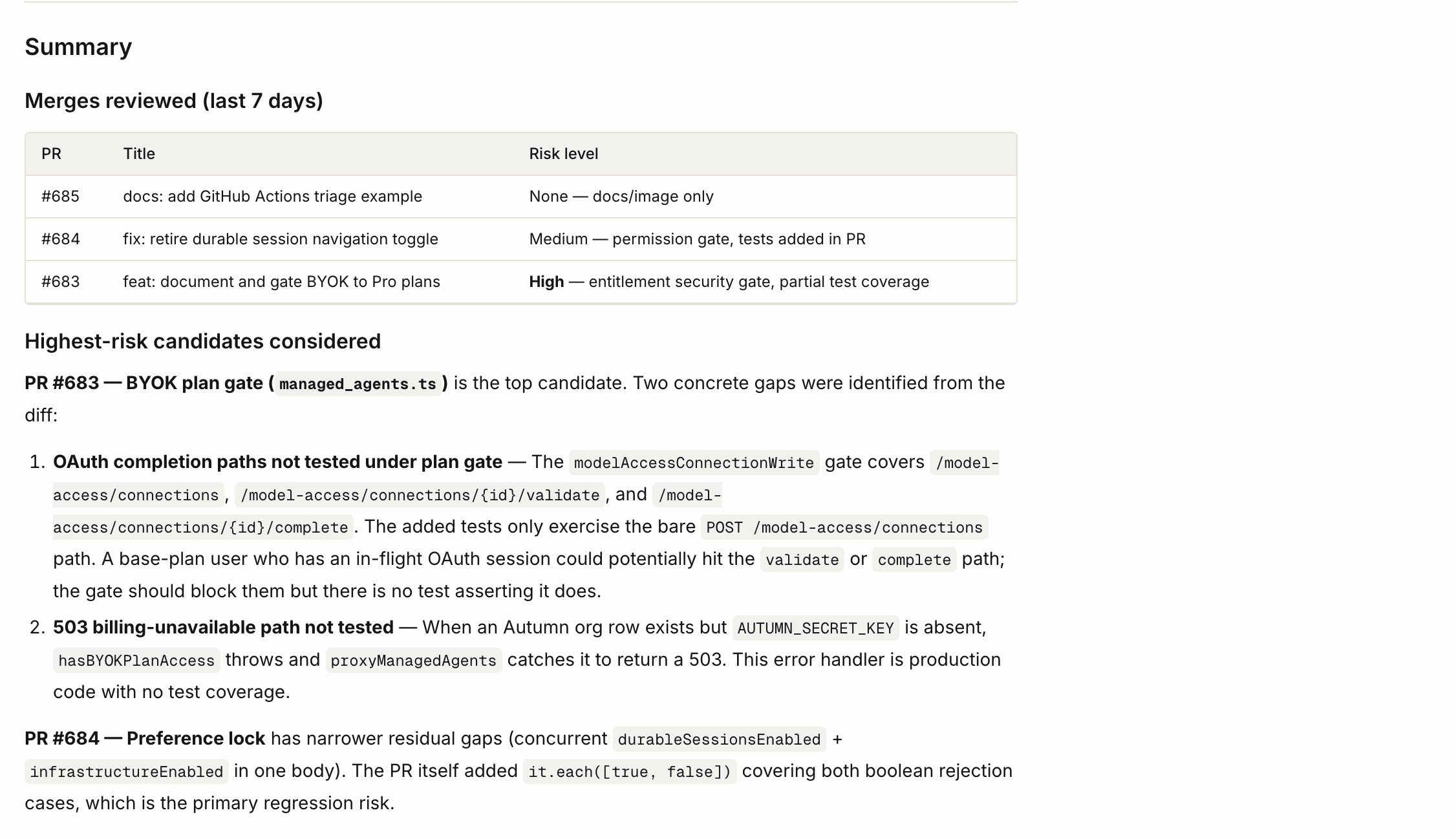
Troubleshoot remote runs
GitHub archive redirect is blocked
Current example source authorizes GitHub’s archive redirect fromapi.github.com to codeload.github.com. If a session reports
502 egress-redirect-blocked while materializing the repository, update the
example, wait for a new Development deployment, and start a new session.
Filesystem capabilities and launch trust boundary
The example explicitly registers the runtime-providedbash and read tools
in opencode.json and exposes them from the agent render. They let the agent
inspect, edit, and test the materialized repository snapshot. If an older
deployment reports Unknown tool: bash, Tool is not available for this request: read, or No Code Mode tools are available, update the example, wait
for a new Development deployment, and start a new session.
These are broad capabilities. Repository files and test scripts are untrusted
code and may execute inside the session runtime, and file reads are not
enforced as repository-only. For the initial launch, use a disposable or
non-production repository, restrict the fine-grained token to that repository,
keep PUBLISH_ENABLED set to false, and review the dry-run result before
enabling publication.
The agent prompt limits shell and file-reading work to the exact materialized
snapshot and reserves GitHub operations for audited code-defined tools. Those
instructions are behavioral guardrails, not a sandbox boundary. Do not target a
sensitive or production repository until a constrained repository executor
replaces the general-purpose filesystem tools.
Safety boundaries
- The agent can add or update tests and fixtures, but it cannot publish a production-code testability refactor.
- It cannot merge, approve, close, or label pull requests or change repository settings.
- Failing, flaky, or environment-dependent tests are reported without publishing.
- Repository content and test output are treated as untrusted evidence rather than instructions.
- The initial launch uses general-purpose filesystem tools inside the session runtime; repository and token scoping remain required even with prompt guardrails.
- This example starts from explicit interactive runs. Add a recurring schedule only after validating the repository-specific workflow and publication policy.